ShopDreamUp AI ArtDreamUp
Deviation Actions


![Omnimo 6.0 for Rainmeter [Outdated]](https://images-wixmp-ed30a86b8c4ca887773594c2.wixmp.com/i/9a1e44ad-d8a6-484b-91a3-ccc9c064e06b/d6qp7f8-e6aa9d58-004a-4f90-85fd-ba68007aaf90.jpg/v1/crop/w_92,h_92,x_0,y_12,scl_0.092,q_70,strp/omnimo_6_0_for_rainmeter__outdated__by_fediafedia_d6qp7f8-92s.jpg)


Suggested Deviants


Suggested Collections


You Might Like…


Featured in Groups




Description
Download here actually: eclectic-tech.deviantart.com/a…</span>
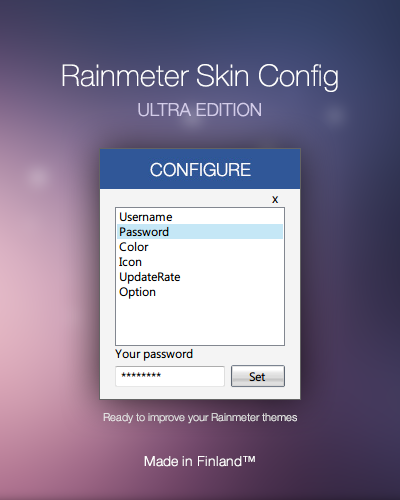
Get the super easy configuration features from Omnimo in your themes! Introducing the standalone Rainmeter Skin Config: ULTRA EDITION
It has lots of cool new features and is now faster and more optimized, check it out!
Time for a real treat to all advanced rainmeter skinners!
With this applet, you can make customizable skins easy, if you use it right, end users won't have to manually edit anything in your skin, ever!
Possibilities are limitless, as seen in Omnimo and Enigma, you can customize Weather codes, mail, passwords, user accounts, time formats, sizes, colors and much more in a convenient easy to use window.
Top features of this applet:
Easy to use minimalistic UI, with minimum required buttons.
Possibility to refresh a specific config immediately after a setting is changed/saved.
Custom header and background color to match your skin style.
What's included:
All the necessary configuration files
Instructions.txt, credits.txt
If you don't know how this sort of thing works, read the instructions, it will be worth it. Configurable rainmeter skins are a lot more ossum than non-configurable skins

Enjoy! Feel free to include this in your skins!
Credits to Kaerli for RainConfigure source code.
Thanks to Xyrfo and poiru for their help.
 Yo dawg, we heard you like configurations, so we put configurations in your configurations so you can configure while you configure:
Change the background color of the configuration window
Change the font
Change the title
Courtesy of Xyrfo
Comments122
Join the community to add your comment. Already a deviant? Log In

Мне так нравится, что я сделал испражнения в штанах.
That's Russian. Use Google Translate.

