ShopDreamUp AI ArtDreamUp
Deviation Actions


![Tuesday [2/5] - Minimal Desktop](https://images-wixmp-ed30a86b8c4ca887773594c2.wixmp.com/f/9a1e44ad-d8a6-484b-91a3-ccc9c064e06b/d6t43yz-61ea2ee9-6e00-47c0-8f2b-9d3d2a345f57.png/v1/crop/w_92,h_92,x_59,y_0,scl_0.085185185185185,q_70,strp/tuesday__2_5____minimal_desktop_by_fediafedia_d6t43yz-92s.jpg?token=eyJ0eXAiOiJKV1QiLCJhbGciOiJIUzI1NiJ9.eyJzdWIiOiJ1cm46YXBwOjdlMGQxODg5ODIyNjQzNzNhNWYwZDQxNWVhMGQyNmUwIiwiaXNzIjoidXJuOmFwcDo3ZTBkMTg4OTgyMjY0MzczYTVmMGQ0MTVlYTBkMjZlMCIsIm9iaiI6W1t7ImhlaWdodCI6Ijw9NDUwIiwicGF0aCI6IlwvZlwvOWExZTQ0YWQtZDhhNi00ODRiLTkxYTMtY2NjOWMwNjRlMDZiXC9kNnQ0M3l6LTYxZWEyZWU5LTZlMDAtNDdjMC04ZjJiLTlkM2QyYTM0NWY1Ny5wbmciLCJ3aWR0aCI6Ijw9MTYwMCJ9XV0sImF1ZCI6WyJ1cm46c2VydmljZTppbWFnZS5vcGVyYXRpb25zIl19.6XxajlsEb1vKIIGHRuWMS4egAtz6FJrj6IJNMSIHyhE)


Suggested Deviants


Suggested Collections


](https://images-wixmp-ed30a86b8c4ca887773594c2.wixmp.com/i/982b717d-7c9e-4f32-99bf-5c01a500f916/d8x1rse-c0106618-3978-4e56-bc86-4973bac95b75.png/v1/crop/w_184,h_184,x_36,y_0,scl_0.23958333333333,q_70,strp/icon_dock_2_0__outdated__see_desciption__by_fivetwofoureight_d8x1rse-92s-2x.jpg)
](https://images-wixmp-ed30a86b8c4ca887773594c2.wixmp.com/i/982b717d-7c9e-4f32-99bf-5c01a500f916/d8x1rse-c0106618-3978-4e56-bc86-4973bac95b75.png/v1/crop/w_92,h_92,x_18,y_0,scl_0.11979166666667,q_70,strp/icon_dock_2_0__outdated__see_desciption__by_fivetwofoureight_d8x1rse-92s.jpg)


You Might Like…



Description
Update!
Add rounded edges version (from win7)
Added mouseover effect
Miranda is EXTREMELY HARD TO CONFIGURE, I had to spend a WHOLE lot of time before i configured it to perfection
You need CLIST MODERN for this to work!: [link]
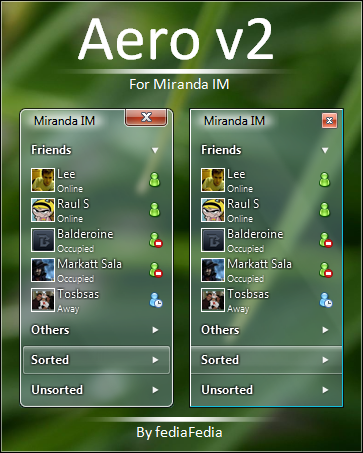
Follow the screenshots to make your miranda look exactly like on the preview, to enable aero glass go to Conntact list, Window tab and click enable aero glass (Vista)
A very simple aero skin for miranda in tool window style
The blur and colorization will work only in vista and seven with aero enabled!
Copy skin folder to C:\Program Files\Miranda IM\Skins, open options, customize, contact list skin and browse to this skin.
If you're new to miranda take the time to study my Configuration images I included.
Thanks to balderoine for the help
Comments are welcome!
P.S. On XP and vista\seven without aero it will look like this: [link]
Add rounded edges version (from win7)
Added mouseover effect
Miranda is EXTREMELY HARD TO CONFIGURE, I had to spend a WHOLE lot of time before i configured it to perfection
You need CLIST MODERN for this to work!: [link]
Follow the screenshots to make your miranda look exactly like on the preview, to enable aero glass go to Conntact list, Window tab and click enable aero glass (Vista)
A very simple aero skin for miranda in tool window style
The blur and colorization will work only in vista and seven with aero enabled!
Copy skin folder to C:\Program Files\Miranda IM\Skins, open options, customize, contact list skin and browse to this skin.
If you're new to miranda take the time to study my Configuration images I included.
Thanks to balderoine for the help
Comments are welcome!
P.S. On XP and vista\seven without aero it will look like this: [link]
![[link]](https://www.deviantart.com/users/outgoing?http://www.upload.ee/image/46297/xp.png)
© 2009 - 2024 fediaFedia
Comments86
Join the community to add your comment. Already a deviant? Log In
Great!!!
How this is done with the technical side?
Is it possible to do so, what would it look like a window "in focus" (more saturated).
P.S. Sorry for my english.
How this is done with the technical side?
Is it possible to do so, what would it look like a window "in focus" (more saturated).
P.S. Sorry for my english.